When parents search for the best app to teach a toddler their First 100 Words, most apps on the store have the exact same flaw: they trap your toddler in silent 2D cartoon tapping drills that don't transfer to real life! Kid Speech AI: Play & Learn ($9.99/mo or $79.99/yr with a 7-day free trial on Google Play) is built around real-world language transfer—combining Scheduled Pop-Up Image & First-Person Action Video Flashcards over any app, Custom Family Photo & Video Cards, Live 2-Second AI Camera Object Naming, Real-Time Action Narration, and 3D AR Exercise across 27 expressive voices!
Why Real 3-Angle Photos & First-Person Action Videos Beat 2D Cartoons
Cognitive development research calls it the video transfer deficit: a 1- or 2-year-old who taps a purple cartoon cow on a tablet screen often doesn't connect that cartoon to a real dog, cup, or shoe in your living room. To speak their First 100 Words in real life, toddlers need three things: (1) seeing real objects from multiple angles, (2) watching first-person hand actions that fire mirror neurons for verbs, and (3) naming the exact physical objects in their own home.
6 Ways Kid Speech AI Builds Your Toddler's First 100 Words Faster
- 1. Scheduled Pop-Up Image Flashcards (3 Real Studio Angles Over Any App): Instead of fighting over tablet time, schedule gentle 5-second pop-up flashcards that appear right over your child's favorite video or show—displaying real objects from Front, Side, and 3/4 Back angles!
- 2. First-Person POV Pop-Up Video Flashcards (For Action Verbs): Toddlers can't build 2-word sentences without verbs! Our short video flashcards show real actions (rolling, stacking, scooping, washing, waving) so verbs click instantly.
- 3. Custom Family Photo & Video Flashcards (100% On-Device Privacy): Snap photos or 5-second clips of Mommy, Daddy, Nana, the family dog, and your child's own teddy bear so their most motivating words pop up first!
- 4. 2-Second Live AI Camera Object Naming: Point your phone camera at any real object in your kitchen, playroom, or yard—hold steady for 2 seconds and hear the word spoken clearly across 27 friendly voices.
- 5. Real-Time AI Action Narration & 3D AR Exercise Mode: Turn live movement and dance breaks into spoken action sentences with 3D AR Exercise characters right on your living-room floor!
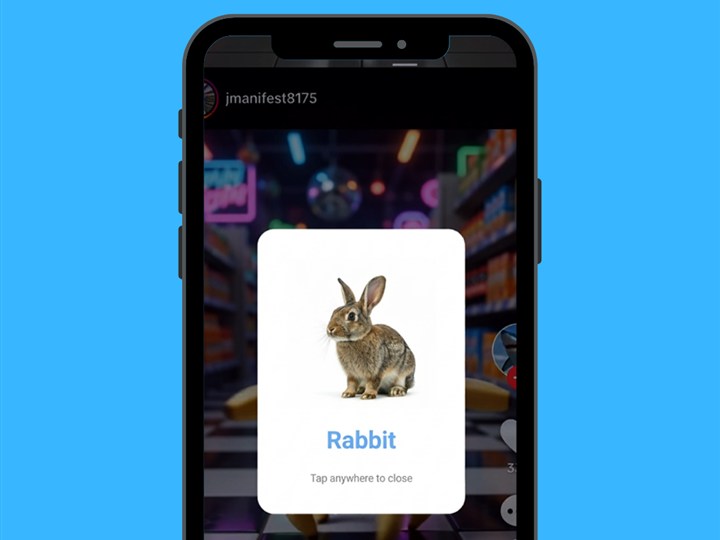
Pop-Up Image Flashcards teach real objects from 3 studio angles right over your child's screen time!
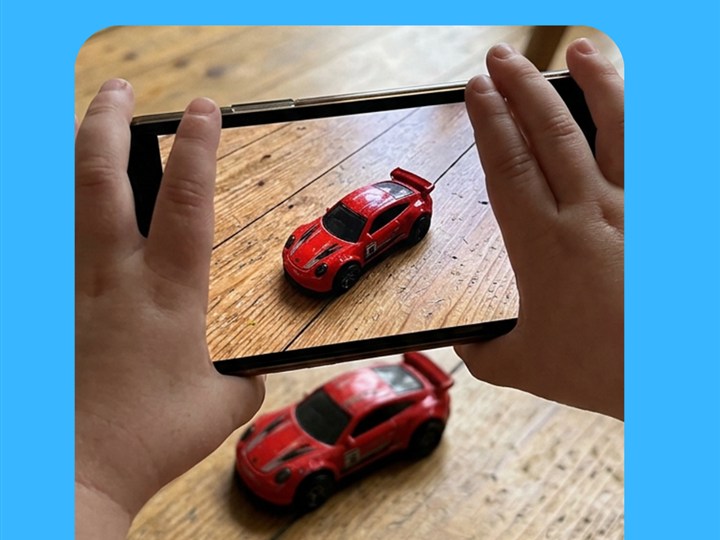
Live AI Camera Object Naming lets toddlers point your phone at real toys, foods, and shoes to hear them named instantly.
At-Home Vocabulary & Routine Comparison Guide
| Feature That Drives Real Talking | Ordinary 2D Cartoon Flashcard Apps | Kid Speech AI: Play & Learn (Google Play) |
|---|---|---|
| Visuals for First 100 Words | Flat 2D cartoon clip-art drawings | 3-Angle Real Studio Photos + First-Person Action Videos |
| Real-World Home Objects | Fixed menu of generic cards only | Live 2-Second AI Camera Naming + Custom Family Cards |
| Works During Screen Time | Requires opening a separate quiz app | Scheduled Pop-Up Flashcard Overlays over any app |
| Voice Variety & Movement | 1 robotic voice; sitting still | 27 Cheerful Voices + Live Action Narration + 3D AR Exercise |
Frequently Asked Questions for Parents
What ages is Kid Speech AI: Play & Learn designed for?
Kid Speech AI is designed for toddlers, late talkers, and young learners ages 12 months to 7 years—from babies learning their first 10 to 100 words to preschoolers building 3- to 5-word action sentences.
Can I try all 6 modes for free before paying?
Yes! Every download on Google Play starts with a 7-day free trial with unlimited access to all 6 modes ($9.99/month or $79.99/year after, with 1-tap cancellation anytime).
Where can I get the free Printable & Interactive First 100 Words Checklist?
Right here on kidspeechai.com! Tap the 'Free Interactive First 100 Words Tracker' button at the top of this guide to check off your child's words by category.
Turn Everyday Play & Screen Time Into Real Words!
Try all 6 interactive vocabulary modes free for 7 days on Google Play ($9.99/mo or $79.99/yr after—cancel anytime in one tap).
▶ Start 7-Day Free Trial on Google Play