One of the biggest breakthroughs in home speech therapy doesn't come from talking more—it comes from pausing for 5 full seconds after you model a word! While adults reply in less than half a second, a toddler's developing brain needs 3 to 5 seconds to process your voice, coordinate their lips and tongue, and push a word out. Kid Speech AI: Play & Learn ($9.99/mo or $79.99/yr with a 7-day free trial on Google Play) builds calm, steady pacing right into play with its 2-second Live Camera Focus Detector and 27 expressive voices!
Why Filling Every Silence Accidentally Steals Your Toddler's Turn
When parents feel anxious about a late talker, it is completely natural to fill every quiet moment with more questions: "Do you want milk? Are you thirsty? Want your blue cup? Here’s your milk!" The problem is that every time you ask a new question, your toddler’s brain has to throw away the word it was trying to build and start processing all over again! Counting silently to 5 on your fingers—while leaning in with warm eye contact, raised eyebrows, and an encouraging smile—gives your child the quiet runway they need to speak.
3 "Expectant Pause" Routines That Spark Spontaneous Words
- The "Ready, Set... [5-Second Pause]" Launch: Before pushing your child on a swing, rolling a ball, or letting go of a toy car at the top of a ramp, hold the toy still, say "Ready, set...", and freeze with a big excited smile for 5 full seconds. The moment your child makes a sound, gesture, or says "Go!", release the car immediately!
- Pair the 2-Second Camera Scan With a 5-Second Echo Pause: When your child holds Live Camera Object Naming in Kid Speech AI steady on a household object for 2 seconds and the app announces the word (e.g., "Apple!"), smile at your child and wait quietly for 5 seconds before scanning the next item—giving them space to echo the word back!
- Pause Before the Last Word of a Favorite Routine Phrase: During bath time, snack time, or bedtime songs, stop right before the final predictable word ("Twinkle, twinkle, little..." or "Put your shoes...") and look expectantly at your child for 5 seconds so they can fill in the blank.
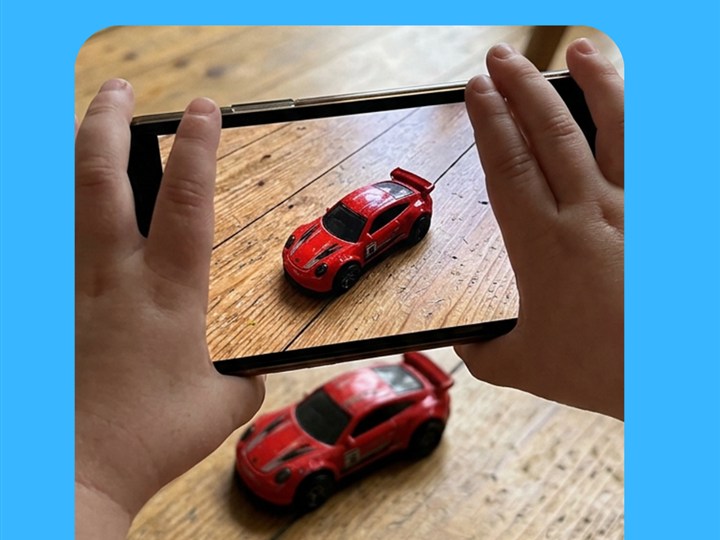
The 2-second steady focus window in Live Camera Object Naming naturally slows play down so toddlers can process and repeat words.

Hear clear, unhurried word models across 27 friendly voices—then pause 5 seconds for your child's turn!
At-Home Vocabulary & Routine Comparison Guide
| Everyday Moment | What You Say First | What Happens During Your 5-Second Pause |
|---|---|---|
| Handing Over a Snack | "Want cracker... or banana?" | Hold both choices at eye level and wait quietly for a look, point, or word |
| Rolling a Ball Back and Forth | "Ready, set..." | Hold the ball against your chest with raised eyebrows until they say "Go!" or "Ball!" |
| Opening a Closed Door or Box | "Door is shut! We need to..." | Keep your hand on the knob and wait 5 seconds before modeling "Open!" |
| Scanning a Toy With Kid Speech AI | App speaks: "Shoe!" | Smile warmly and count to 5 in your head so your child can echo "Shoe!" |
Frequently Asked Questions for Parents
What if I wait 5 full seconds and my toddler still doesn't say anything?
Never force or pressure them! After 5 seconds of warm smiling silence, simply say the target word cheerfully yourself ("GO! Here goes the car!") and complete the action so the game stays 100% fun and stress-free.
How do I keep myself from talking too soon during the pause?
Silently tap your thumb against each of your 5 fingers behind your back (1-Mississippi, 2-Mississippi, 3, 4, 5) while keeping an excited, expectant facial expression!
Why does Kid Speech AI wait 2 seconds before naming an object on camera?
Toddlers move constantly! Waiting for 2 seconds of steady visual focus ensures your child is actually looking at the object when the word is spoken out loud.
Turn Everyday Play & Screen Time Into Real Words!
Try all 6 interactive vocabulary modes free for 7 days on Google Play ($9.99/mo or $79.99/yr after—cancel anytime in one tap).
▶ Start 7-Day Free Trial on Google Play