
You do not have to take away your toddler’s favorite videos to make screen time educational. Kid Speech AI: Play & Learn runs a smart Pop-Up Image & Video Flashcard overlay right over whatever video or game your child is watching—automatically pausing passive zoning-out with cheerful, spoken word flashcards.
Why Toddlers "Zone Out" During Regular Videos
Every parent needs 15 minutes to cook dinner, answer an email, or fold laundry. But traditional toddler videos move so rapidly—with constant background music and scene changes—that young learners often tune out individual words.
Instead of fighting battles over turning off your child's favorite shows, what if their screen time automatically paused for 5 seconds of focused word learning every few minutes?
How Pop-Up Image & Video Flashcards Work
Kid Speech AI: Play & Learn introduces a breakthrough for busy parents: Scheduled Pop-Up Flashcard Overlays.
- Set Your Schedule: Choose how often flashcards pop up and pick between AI Image Flashcards, real-motion Video Flashcards, or your own Custom Family Flashcards.
- Let Your Child Watch or Play Normally: Open their favorite video app or game.
- Automatic Word Pop-Ups: Right on schedule, a clean card (like "Rabbit" with a crisp photo or live video clip) pops up over the screen, speaks the word clearly using 27 friendly voices, and closes with a simple tap!
Finish Screen Time with a 2-Minute 3D AR Movement Break
Transitioning off a screen is much easier when you turn the end of screen time into a movement game. Open Interactive 3D AR Exercise inside Kid Speech AI and let your toddler copy a cheerful 3D character doing stretches, dances, and goalkeeper catches right in your living room!
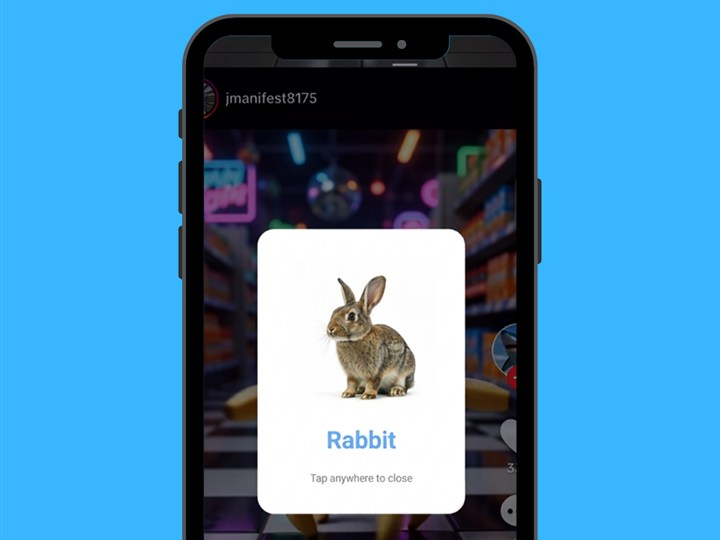
Pop-Up Image Flashcards: Automatically pops up clear, distraction-free word cards right over your child’s favorite videos or games.
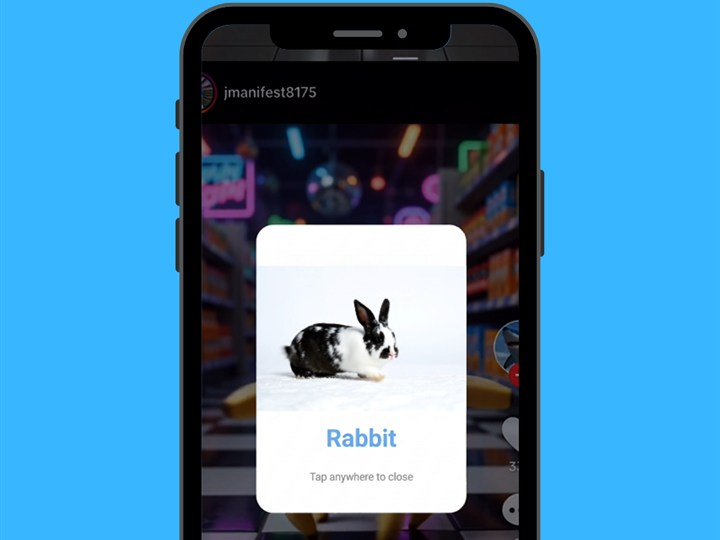
Pop-Up Video Flashcards: Brings words to life with real motion clips that turn regular screen time into active word discovery.
Passive Screen Time vs. Kid Speech AI Pop-Up Overlay Screen Time
| Feature | Passive Video Streaming Alone | Screen Time + Kid Speech AI Pop-Up Flashcards |
|---|---|---|
| Child Engagement | Passive watching ("zoning out") | Active tapping, looking, and repeating spoken words |
| Visual Pacing | Fast background cuts and noisy music | Clean white background flashcard isolating 1 clear word |
| Personalization | Generic cartoon characters only | Includes Custom Family Photos & Videos (Mama, Dada, Pets) |
| Vocal Variety | Single cartoon voice | 27 warm, friendly AI voices for stronger word retention |
| Active Movement | Sitting still the entire time | Switch to 3D AR Exercise mode for active stretching & dancing |
Frequently Asked Questions
Do Pop-Up Flashcards work over any video or game app on Android?
Yes! Once you grant the standard Android display-over-other-apps permission inside Kid Speech AI, scheduled image, video, and custom family flashcards automatically pop up over whatever video or game is on screen.
Can I choose whether pop-ups show images, videos, or my own family photos?
Yes. Parents have full control to display AI Pop-Up Image Flashcards, Pop-Up Video Flashcards, Custom Family Photo/Video Cards, or a mix of all three.
How does the 7-day free trial work on Google Play?
You can test all 6 learning modes—including Pop-Up Image & Video Flashcards—free for 7 days on Google Play ($9.99/month or $79.99/year after trial, cancel anytime in one tap).